Content feed Comments Feed

Mechanical tumor, external heart, elastic cell - CPU Load Meter

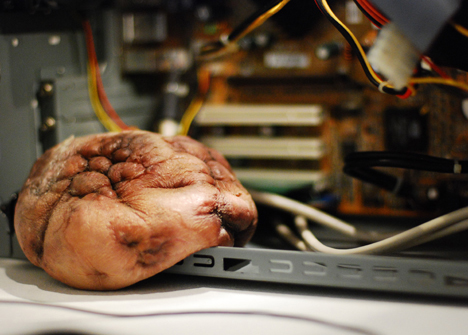
Interactive media artist Mio I-zawa’s “mechanical tumor” is a quivering hunk of fleshy, organic-looking material that expands and contracts depending on the amount of stress your computer is experiencing ....
Your Ad Here

Dell Latitude Z: 16-inch notebook weighs 4.5 pounds, charges wirelessly

Dell’s got something for the business set today in the 16-inch Latitude Z, a $2000 notebook that measures just over half an inch thick, weighs 4.5 pounds, and charges wirelessly ....
Your Ad Here

The Very First Lighter Phone SB6309

Although I fully admit to chuckling quite a bit after first seeing this cellphone with a built-in cigarette lighter, I can see some practicality with it. After all, I can’t tell you how many times I’ve heard of my smoking friends losing their lighter. I’ve been asked numerous times if I happen to have a lighter on me, despite that they’re fully aware I don’t smoke. Having a lighter built into your cellphone would come in incredibly handy. After all, your phone is almost always somewhere within reach.....
Your Ad Here

How to Send Free MMS in BSNL Network

Posted by Wonderful-Tricks

How to Send Free MMS in BSNL Network

Hello bsnl users here is a trick for you to send free mms in bsnl mobiles.to send unlimited free mms in your bsnl mobile to another mms mobile follow the settings below


goto--->menu
select--->tools
goto--->settings
select--->connection
select--->access points
goto--->options
select--->new access point
in connection name
type "free mms"
data bearer--->packet data/gprs
access point name --->gprssouth.cel lone.in
home page --->http://mms/mmsc
then option advanced settings
networt type--->IPv4
proxy server address--->10.100.5.20
proxy port number--->3100
save it and while trying to send mms add +0091 before the number and thats all,you can now send unlimited free mms in bsnl mobile network india.

Free Missed Call Alert for BSNL

Posted by Wonderful-Tricks

Free Missed Call Alert for BSNL

Bsnl missed call alert 2009 tricks makes you to know who have called you when you are out of coverage or when your mobile is switched off.the advantage in this trick is that what other people do for 30 rs per month,we do it for free.to activate free bsnl missed call alert trick follow these steps below


Dial *62*17010#

or

---->menu
---->tools
---->settings
---->phone
---->call divert
---->voice calls
---->options
---->activate
---->to voice mailbox

type the number as '17010' save it and thats ok,you can now receive free missed call alerts in bsnl mobiles.

Idea Free Calling Trick

Posted by Wonderful-Tricks

Idea Free Calling Trick

Idea mobile tricks are very few in the net.i have found a idea free calling trick when i googled last night.to access idea free calling trick you must be an life time prepaid user on idea and you must have s60 or higher mobiles..the great thing about the trick is it working nearly for 6 months. for free and add on members cannot use this trick
do the following:


Free Calling Trick for Idea Users.

Dail 55555 and then type A/C No 1234567896328#.

Type Password 1234# Enjoy Free calls.

P.S :- Remember this trick for few states only.


Free Airtel Missed Call Alert for Tamilnadu

Posted by Wonderful-Tricks

Free Airtel Missed Call Alert for Tamilnadu

This is airtel free missed call alert trick for airtel users tamilnadu circle.


Just Dial *62*+919894035100#

or

go to Call Diverts -> select when out of reach -> input +919894035100.

AIRTEL FREE MMS SETTINGS

Posted by Wonderful-Tricks

AIRTEL FREE MMS SETTINGS

The settings below is the settings for Free MMS in airtel prepaid mobile phone.configure these mms settings in your mobile phone to access free mms in airtel mobile.
Now u can send free MMS with Airtel Prepaid


goto tool->setting->conection
Create a new conection
Conection Name : FREE MMS
Access Point Name : airtelfun.com
User Name : Blank
Password : Blank
Homepage : http://100.1.201.171:10021/mmsc
Proxy Server : 10.2.45.155
Port : 8080

TATA DoCoMo Free message centre Number

Posted by Wonderful-Tricks


TATA DoCoMo Free mesageg centre Number
Below is the free message cntre number which you can sent free unlimited free message...


+919037442369


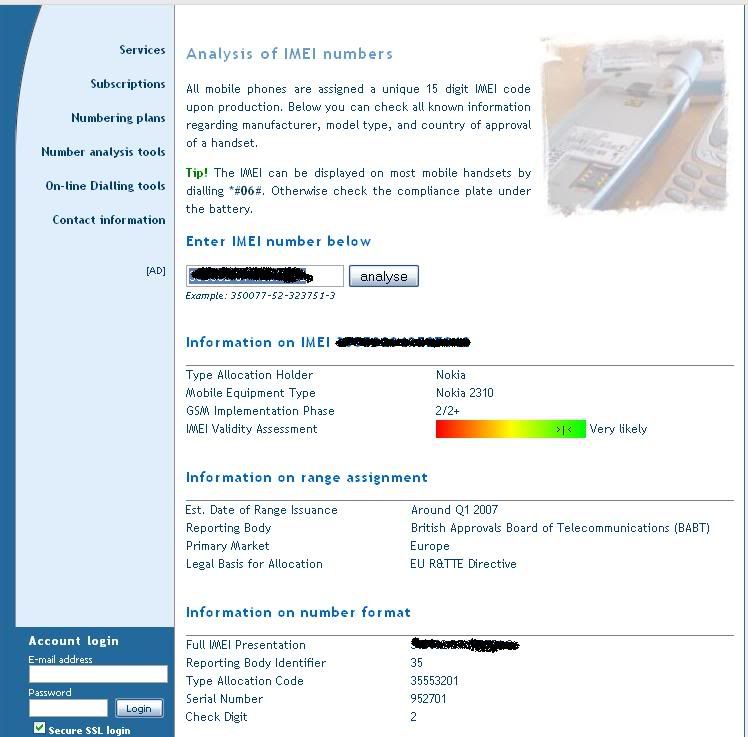
Verify your Mobile IMEI number online for free

Many a Times, we have asked ourselves this question: Is my IMEI/Phone Authentic?????
The reason this question pops up is Chinese Manufacturers are flooding the World Market with cheap imitation phones. (I went to a dubious shop & came across a Nokia 6300: Exact Body, But OS, completely different!!!!)
This put me to thinking, If I buy a phone, how do I verify my IMEI is unique. It is very likely, that a Chinese Vendor might have manufactured the phone & inserted some Nokia model's IMEI.
Extensive Online Search yielded the Following Site:


Click here to verify


How to Deactivate Aircel Dialer Tune at Low Cost

Hi aircel subscriber, do you want to deactivate caller tune/dialer tune service? mobile providers usually dont help when you want to get away from a plan that they are getting numerous money, but the method to de-activate dialer tune is very simple.


SMS "UN DT" To "55656" (without quote)

and within 48 hours it will be de-activated.
Charges for SMS is Rs.3.


How To Block Unwanted Calls in Aircel?

Posted by Wonderful-Tricks

How To Block Unwanted Calls in Aircel?

Hi aircel users! do you get a number of unwanted calls daily from advertisement company,insurance agents and others?if you want to block these unwanted callers from calling you then follow certain simple steps to register your name in the national do not call registry and then you will have a peace mobile life.


SMS "START DND" To 1909(Toll Free)

Then You may get a sms like this "Dear Subscriber , Your request for Do Not Disturb service has been registered.
Assuring you our best services. (Reference No : DNDA071592) - Aircel. Thank You. Thats it..
Have Fun..


Free Aircel Mobile Center Number For Sending Free SMS

Hi aircel subscribers!we have an free sms trick.it has been tested in tamilnadu and southern zones. it works fine when you are in roaming also.so to use this new sms trick you have to configure these sms center number in your sms settings of aircel prepaid mobile.


Free Mobile Center Numbers are:

+919050563222

+919050563221


Free Aircel Missed Call Alert All States Working

Aircel users now dont miss any important calls even you are in no network area or you switched off your mobile.
To Activate this trick for free just by dialing


*62*+919842201006#


Aircel Free GPRS and WAP Setting for I-Mate Pocket PC

Configure Device For Internet Web Browsing. (Connecting Your Phone As Browser)

1. Tap Connection
2. Under My ISP, Select (Add A New Modem Connection).
3. Enter A Name For Your Connection; Aircel Gprs (Any Thing You Want )
4. From The Select Modem Drop Down Box Choose Cellular Line (GPRS)
5. Tap Next
6. In The Text Box Labeled (Access Point Name) Type In (aircelgprs). Type In Small Letters And Without Space.
7. Tap Next
8. Leave The User Name, Password and Domain Fields Blank.
9. Tap Finish
10. Tap OK

*Your Device is now ready to browse the Internet.


Configure Device for Pocket Internet

1. Under My Work Network, Select (Add a New Modem Connection)
2. Enter a name for your connection; I used (Pocket Internet)
3. From the select a modem drop down choose Cellular Line (GPRS)
4. Tap Next
5. In The Text Box Labeled ( Access Point Name) Type In (aircelgprs)
6. Tap Next
7. Leave The User Name, Password, And Domain Fields Blank.
8. Tap Finish
9. Tap the Proxy Setting tab
10. Place A Check In Both Boxes
11. Type 172.12.83.69 and Port Number: 8080
12. Tap Advanced
13. Leave The HTTP And Socks Server Fields Blank.
14. Tap OK Twice

That’s it we have done now open internet explorer and start browsing.
Enjoy…


Rescue your cell from water

Posted by Wonderful-Tricks

You always try to protect your cell from not going into water, but atleast once in its lifetime, it finds its way into water. That’s a very sad moment. But does this mean that it’s time to abandon your cell phone? No! Especially not if you try this home remedy.


First of all, take out the phone battery from the cell immediately. This will prevent electrical short circuits within the cell which can even burn the internal parts of your cell.


Next, gently wipe your cell with a tissue, and bury it into a jar full of uncooked rice. Yes, rice! Remember that the coconut is kept in dry rice to keep moisture away? It’s the same logic that works here too. It has been found that rice has a high chemical affinity for water. In simple words, it attracts water. So, water doesn’t stick to the cold metal of your cell, instead it is soaked by the rice, thus leaving your cell dry (well, almost dry). That’s awesome remedy, isn’t it?

Source: TOI E-Paper

Testing Components of Sony Ericsson Phone

Posted by Wonderful-Tricks

Like any consumer electronic product, mobile phones too sometimes behave in an inappropriate way. Here we shall deal with how to test different services / components of a Sony Ericsson mobile phone. With this, you will be able to test different hardware components like Main Display, LED / Illumination, Keypad / Keyboard, Speaker, Earphone, Microphone, Vibrator, Camera, Flash LED, Memory Stick, FM Radio etc. This works for most of the handsets though I am unsure about the low end models.


There is one secret menu in the Sony Ericsson phone which most of the users are not aware of. It can be accessed with a serial key press in a specific order (secret code).

Here we go: Press > * < < * < * . If you cannot follow the symbols, please have a look at the following figure and you will understand.


Once you press this key sequence, you will be presented with a menu which has options like Service Info, Service Tests and Text Labels. Select Service Tests. Now you are up with the menu to test different components of your phone. Different components are tested different way and you will not find it difficult to carry over the process.


Trick To Remove Clip History from NOKIA Mobile's
RealOne player-
it is very simple u just need a file manager like fileman or x-plore etc
in that open c drive
then go to System
then goto DATA
inside that
Just delete the Following File
C: \System\DATA\Mediaplayer.dat


Try typing "7448" on your T9 enabled mobile phone and you will be surprised to see that your phone has guessed the word "Shiv" and not the more commonly used slang - S**t.

That’s because the default T9 Text input system doesn’t support any of the common curses or slangs and the only option you have is to manually type in those words.


*T9 is short for "Text on 9 Keys."

Syncing all your details on mobile handsets with computers have become really very important to avoid any accidental loss of data (especially contacts, memos and messages) on your phone. If you have ever lost your mobile phone or come across any software issues, then you must be knowing how important it is to make a backup of all the datas on a secure place.


Though you can easily take a back-up of all the data on your PC using the softwares that come along with the mobile handset, but what if the data on your PC too gets deleted? Recently, Google have come up with a new service – Google Sync using which you can sync all data of your mobile with your Google account and vice versa using GPRS on your phone.

Supported Devices:

  • Apple iPhone
  • Blackberry
  • Nokia s60 & s40 phones
  • Sony Ericsson
  • Windows Mobile


The complete step-by-step procedure on syncing your devices is mentioned here.

Though I could not test out this service personally as am using a palm based handset which is not supported for this service, but to me it seems to be very useful service and of course reliable too, as its being provided by Google. If any one have used it, then let us know your reviews about this service.

Links:
Google Sync
FAQ & Setting Procedure

Nokia Secret Codes/Hacks !

Posted by Wonderful-Tricks


These codes for the Nokia phones provide some interesting information for users, they unlock some hidden functions. These codes are often refereed to as "Nokia Secret Codes" or "Nokia Hacks". Use the codes at your own risk, not all Nokia phones support all codes, I have tried to split them into these groups.


These 3 codes work on 90% of Nokia phones;

*#06#Display the IMEI (Standard GSM command, works on all phones)
*#0000#Display the firmware version and date
*#92702689#Here you can view the S/N and the IMEI as well as the life timer (newer models). The date the phone left the factory and the date it was purchased. If your phone has been repaired the date of the repair is also visible. You will need to turn the phone off to exit this menu. Newer phones simply require you to press ok.


The following codes are specific to older series 40 phones;

*#746025625#Sim clock allowed status.
*#62209526#Display the MAC address of the WLAN adapter. This is available only in the newer devices that support WLAN
#pw+1234567890+1#Shows if sim have restrictions.
#3370#Deactivates Enhanced Full Rate
*#746085685#Display the SIM clock status

The following codes are phone specific or phase related;

*#7220#Activate the GPRS PCCCH support (Packet Common Control Channel)
*#7230#Deactivate the GPRS PCCCH support
*#7760# Display the manufacturing serial number


This only works on the 3310 and 3330;

*#67705646#Clear the operator logo, the logo will be reset to the default network operator logo.

The following codes work on newer series 40 & series 60/80 phones;

*#2820#Display the Bluetooth MAC address (Phone must have a built in bluetooth adapter)
*#7370925538#Reset the mobile wallet (Phone must have the mobile wallet feature)
*#7370#Soft-format the memory (Symbian)
*#7780#Reset to factory defaults, confirmation required (also known has a Hard-format), all phone contents will be wiped clean including contacts and smses if they are stored on the phone

*#92702689# - takes you to a secret menu where you may find some of the information below:
1. Displays Serial Number.
2. Displays the Month and Year of Manufacture
3. Displays (if there) the date where the phone was purchased (MMYY)
4. Displays the date of the last repair - if found (0000)
5. Shows life timer of phone (time passes since last start)

*#7328748263373738# resets security code. Default security code is 12345. If you forgot wallet code for Nokia S60 phone, use this code reset: *#7370925538# Note, your data in the wallet will be erased. Phone will ask you the lock code. Default lock code is: 12345.

If you know more Nokia Secreat codes/ Hacks then comment here. Thanks


Using UCWEB Access Free Airtel GPRS!!

Posted by Wonderful-Tricks


I am again here with the most credible trick for Free GPRS in Airtel with UCWEB. Previously we had a TeaShark application that was awesome with great speed and perfect for browsing, but unfortunately the trick no longer works most of the regions. And your are the lucky one if that still works for you without costing any bucks.

The world of software and hacks is always open for Airtel because it took about six months for Airtel guys to figure out the TeaShark problem and fix it out. But now its another software to replace TeaShark thats UCWEB.


UCWEB is a web browser for mobile devices such as mobile phones. UCWEB is now ranked #1 in the Chinese mobile web browser market. UCWEB just works really fine with Airtel Network and its just free. UCWEB just works fine with Airtel Live costing you nothing.
Link : Download UCWEB for Mobile

Pls do try out.. Not Sure..


Hi Friends...This is a simple trick to play FM without connecting the headphones or earphones...This was checked by one of my friends with Moto W220 and its working perfectly..So it may work on all Motorola Phones.. Plz do check and give ur comments..

[Plz Note :This Is For MOTOROLA ONLY!!!]

Just Dial

*#**372#

or

*#**376#

Drop your comments here and let me know if this trick works for you!!

Blogumulus by Wonderful-Tricks

Followers