Content feed Comments Feed

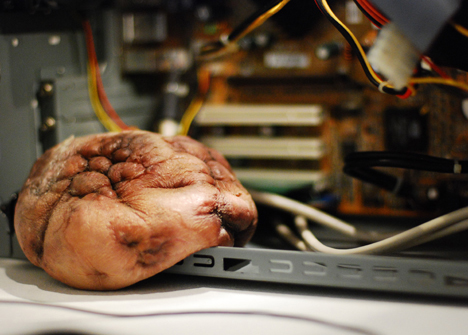
Mechanical tumor, external heart, elastic cell - CPU Load Meter

Interactive media artist Mio I-zawa’s “mechanical tumor” is a quivering hunk of fleshy, organic-looking material that expands and contracts depending on the amount of stress your computer is experiencing ....
Your Ad Here

Dell Latitude Z: 16-inch notebook weighs 4.5 pounds, charges wirelessly

Dell’s got something for the business set today in the 16-inch Latitude Z, a $2000 notebook that measures just over half an inch thick, weighs 4.5 pounds, and charges wirelessly ....
Your Ad Here

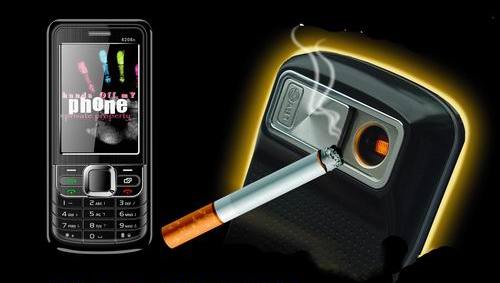
The Very First Lighter Phone SB6309

Although I fully admit to chuckling quite a bit after first seeing this cellphone with a built-in cigarette lighter, I can see some practicality with it. After all, I can’t tell you how many times I’ve heard of my smoking friends losing their lighter. I’ve been asked numerous times if I happen to have a lighter on me, despite that they’re fully aware I don’t smoke. Having a lighter built into your cellphone would come in incredibly handy. After all, your phone is almost always somewhere within reach.....
Your Ad Here

Nikon shoots and shows with embedded projector

As we increasingly use handheld devices as the primary way to share photos and videos, the inevitable conflict arises: how do you keep the device stylishly compact while including a display big enough for the whole gang to huddle around? Nikon's the first--although likely not the last--to address the problem by integrating a tiny projector into its Coolpix S1000pj so that you can display your photos up to 40 inches tall on any surface.


The LCOS projector is rated for up to 10 lumens (brightness), with contrast ratio of 30:1 and a throw of about 10 inches to 6.5 feet in VGA resolution to project an image between 5 and 40 inches high. According to Nikon, the battery will last approximately an hour of continuous projection. It will ship with a stand and a wireless remote.

The camera itself is the typical Nikon point-and-shoot fare. The internal 5x zoom lens covers a 28-140mm-equivalent focal range, but with a maximum aperture of f3.9-5.8, it's awfully slow. It incorporates the standard features rolling out in its siblings, including the 12-megapixel sensor and 2.7-inch 230,000-dot LCD. Like the other cameras announced out this week, it adds motion detection--automatically sensing movement and bumping up ISO sensitivity and shutter speed to freeze action--to its bag of image-stabilization tricks. Keep in mind that almost universally in point-and-shoot cameras, levels above ISO 400 (and sometimes even ISO 200) deliver really noisy photos, which makes a lot of the high ISO-dependent features moot.

The microprojector technology has been around for a couple of years, and the idea of putting then in phones is the most commonly bandied-about application, though cameras seem a natural choice as well. The S1000pj, slated to ship in mid-November, will be priced at $429--that's pretty steep for an otherwise standard snapshooter. But you can't deny the attraction of an easier way to display your photos than connecting to a TV or squinting at a relatively small LCD.


Sony’s new point-and-shoots may actually be different from the rest

When I saw the press release advertising a revolutionary new “back-illuminated” sensor, my BS sensor went to red alert. First, the term is nonsense — misleading at best. Second, what could they possibly do to increase low light performance by a huge amount that nobody’s thought of already? As it turns out, camera companies are dumber than I thought (that or Sony’s BSing skill is better than I thought), because this new sensor configuration appears to be genuinely better. The main tradeoff appears to be cost, though — these cameras are expensive as hell.


Here’s the deal: sensors aren’t just magic planes of photosensitive material. They’ve got circuits on all sides, wires and transistors all over the place, and incredibly, some of it is between the lens and the sensor. I didn’t know that, but I believe it, and if it sounds a little too crazy to you, consider that your eye is organized in much the same way. There’s a bunch of junk between the iris and the light-sensitive part of the retina — so if mother nature made it upside-down, what hope did a bunch of engineers have?

So what Sony’s done, apparently, is cleared out the junk between the lens and the sensor. While I applaud them for their ingenuity (if that’s what it is), I question the benefit of it, since you’d think companies with more experience in lens and sensor design (Nikon, Canon, and Kodak, for instance) would have done something like this if it had the benefits stated. But I digress. Sony says the low-light performance is better, and they’ve actually done something to make it so, so I’ll give them the benefit of the doubt until we get some real testing done.

On to the cameras. Surprisingly, the more expensive TX1 isn’t entirely better than the WX1, just a little more futuristic. Both cameras have 10.2 megapixels, the new “Exmor R” sensor, 10FPS burst capability, built-in burst panorama (thank you), 720p mpeg-4 recording, and all the silly camera modes we’ve come to expect in consumer cameras. Pet mode, really?

Sony TX1
Sony’s new point-and-shoots may actually be different from the rest
The sexy future-camera. 10.2 megapixels, 3″ touchscreen, optical image stabilization. Close focus down to 0.4″, which is great. 4x Zeiss zoom, no 35mm equivalent given, but it seems as if it doesn’t go quite as wide as the TX1 because its panoramas can’t be as wide. Very thin. Costs $380.

Sony WX1
Sony’s new point-and-shoots may actually be different from the rest
The more traditional camera with similarly updated guts. 10.2 megapixels, 2.7″ LCD (not touchable), 5x zoom (24-120mm) at f/2.4, which is quite good for such a small lens. Kind of thin. $350.

So?

Both cameras will be available in September. As for which I’d get… it’s actually kind of a tough call. I’m not too familiar with Sony’s touchscreen interface but I wouldn’t assume it’s a positive. I think in the end, the WX1 is more of a sure bet even though it’s not nearly as thin as the TX1. It’s cheaper, you’ve got a really solid lens on there, and you’re not missing any features other than the touchscreen. I’m actually pleased with Sony in this case (aside from releasing their cameras in the middle of the night like everyone else and pricing them out of my range); they may actually have a superior camera technology here. But like I said before, we can’t know until some testing’s done, and I wouldn’t buy until then.

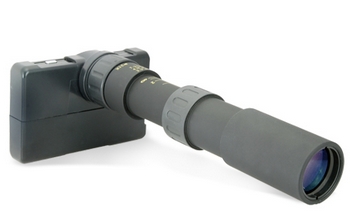
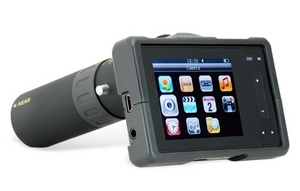
Avatar Digital Binocular Sports Camera – the stakeout machine

World too far away? Want to see stuff but can’t move closer? If you’ve answered Yes to either of these questions then you need the Avatar Digital Binocular Sports Camera. It’s got a 2 megapixel camera with a 21× optical zoom and 2.5″ display. There’s 1 Gb of internal storage, a microSD slot, TV out, a voice memo for dictating your shopping lists and you can record stills or video.


Avatar Digital Binocular Sports Camera – the stakeout machine
When the bird watching get slow, there’s a built-in media player so you can review your footage, or crank some tunes. There’s also an e-book viewer (but .txt files only), calendar, games, a mini tripod and earbuds. Now where have I seen that UI before? AU$158.

The Avatar digital camera lets you can take snap shots from one building looking out on to another building, balcony or apartment, and works best in full daylight conditions. The Avatar comes with a mini tripod and can also be fixed on a regular tripod for extra versatility. With digital 40x and manual 21x zoom function, observing your object of desire has never been more fun.


Samsung has recently announced an addition to their Pixon line of mobile handsets, the Pixon 12. The Pixon has been around for a while and has been known to feature high resolution cameras. And if you’ve been paying attention you’ll know that as far back as February Samsung was rumored to be working on a 12MP phone.


Well, the Pixon 12 takes this to a whole new level featuring a 12MP camera that Samsung seems very excited about saying it’s a world’s first. However, the camera’s resolution isn’t the only thing that makes this a beautiful handset as it also has a 3.1″ AMOLED touch screen with a 10,000:1 contrast ratio, a fast-image saving feature with only 2 seconds of downtime between shots, an auto-focus feature, a 28mm wide angle lens and WiFi support.

Word has it the Pixon 12 will make its way to Europe in June and other regions sometime after.

Source

Canon PowerShot D10 Review

Posted by Wonderful-Tricks

Canon PowerShot D10 Review

The Canon PowerShot D10 represents Canon’s first foray into the all-action world of adventure cameras. The Canon D10 is waterproof up to 10 meters / 33-feet deep, freeze proof from -10°C / 14 degrees Fahrenheit, shockproof up to 1.22 meters / 4 feet, and is fully protected from dust. More regular features include a 12 megapixel sensor, 3x zoom lens with Optical Image Stabilization, 2.5 inch LCD screen, and new Smart AUTO, Blink Detection and FaceSelf-Timer modes. The uniquely styled Canon PowerShot D10 has a recommended price of $329.99 / £379.00 / €449.00 - we find out if this is the perfect action camera.


Ease of Use
The Canon PowerShot D10 is certainly very distinctive, with toy-camera-like looks that you'll either love or hate. Our review model had a turquoise blue and silver colour scheme, which can be customised by purchasing an optional coloured Front Cover Set. This is a well-made digital camera with a sturdy metal body and excellent overall finish. It's just about small enough to fit into the palm of your hand, featuring a 3x optical zoom lens that's equivalent to a focal length of 35-135mm. The maximum aperture is a fast f/2.8 at the wide end and a respectable f/4.9 at the other extreme of the zoom range. The PowerShot D10 is quite bulky, measuring 4.9cms thick when turned off, making it more suited to a small camera bag than a trouser pocket, but it only weighs 190g without the battery or memory card fitted.

As with most Canon cameras that we've reviewed before, the PowerShot D10 is one of the better models around in terms of build quality. Even the tripod mount is metal instead of plastic and positioned centrally in-line with the lens. The only minor criticism is the lack of any handgrip on the front, with just a smooth, flat finish embossed with the Canon logo, making it more difficult to hold than it really should be. Also, changing cards or batteries is not possible while the camera is mounted on a tripod, because the compartment door hinge is too close to the tripod socket.

The Canon PowerShot D10 has relatively few external controls, 14 in total, which reflects the fact that this is quite a simple camera in functionality terms, with only limited photographic control on offer. All the controls are clearly labeled using industry-standard symbols and terminology. As this camera will spend quite a lot of its life underwater, it thankfully has large On/Off and Shutter buttons, and the optical zoom is operated by buttons on the rear, rather than a more fiddly push/pull lever. We would have liked the zoom buttons to have been a little bigger though for quicker access in more unfamiliar shooting environments.

Located on top of the PowerShot D10 are the Print Transfer, Camera/Movie and Play buttons, plus the On/Off and Shutter buttons, and on the bottom are the metal tripod mount and sealed battery compartment, which also houses the SD memory card slot. On the rear of the PowerShot D10 is the 2.5 inch LCD screen, with all the rear controls located to the right. You can directly access the various focus and flash options by clicking left and right on the navigation pad, whilst up and down are respectively used to set the exposure compensation and timer options. There is sadly no dedicated button for ISO speed, which is a commonly used feature, although you can work around this by optionally setting the Print Transfer button to one of 7 available options (which include ISO speed).

Virtually all of Canon's compact digicams offer a few little known but advanced functions, and the PowerShot D10 is no exception. These well-kept secrets, which you usually only learn about if you read the user guide attentively, include auto-focus lock (AFL), autoexposure lock (AEL) and flash exposure lock (FEL). To lock the focus on a subject for a series of consecutive shots, press the Left button on the four-way pad once while holding the shutter release depressed halfway. To lock the ambient exposure, do the same with the Up button. Flash exposure lock is achieved the same way when the flash is set to Forced On. AEL is available in Program, Quick Shot and Movie modes (you needn't hold down the shutter release for AEL when you are in Movie mode though).

The Function/Set button in the middle of the navigation pad opens a sub-menu, which allows you to set ISO speed, white balance, colours, metering, continuous shooting and image size/quality settings. This system is a good compromise given the size of the camera's LCD screen and therefore the limited space for external controls, although using it underwater is rather less intuitive. Note that some of these options may be unavailable depending on which shooting mode you are in.

The 2.5 inch LCD screen has a wide viewing angle from left to right, adequate resolution of 230,000 dots, and is visible in all but the brightest of sunlit conditions. It offers twice the normal levels of brightness by default, with 5 adjustable levels available, and a 2mm perspex shield protects it against scuffs and fingerprints. Both the screen cover and camera body had a few fine scratches, though, after a couple of weeks of use. There is no optical viewfinder on this model.

There is a single sealed port on the right side of the Canon PowerShot D10 (when viewed from the back), which accepts both the USB interface cable required to connect the camera to a printer or computer, and the AV cable. There are no controls on the left side of the PowerShot D10. Interestingly the D10 features an innovative connection system on all four corners of its body, enabling you to decide where the supplied wrist strap or the optional carabineer, shoulder, or neck straps are attached.

The menu system on the Canon PowerShot D10 is extremely straight-forward to use and is accessed by a dedicated button underneath the navigation pad. Quite a lot of the camera's main settings, such as white balance, exposure compensation and ISO speed, are accessed elsewhere, so the main menu system isn't actually that complicated. A row of 2 icons along the top of the LCD screen represents the Camera and Setup sub-menus, with most of the options being the kind that you set once and then forget about.

Due to the bright LCD screen, the various options are easy to access and use, especially as only 6 are shown onscreen at one time. In the Shooting menu, you may do things like specifying the AF Frame (Centre or Face Detect AiAF, the latter of which can now recognise faces at sharper angles), enabling or disabling Servo AF (useful for tracking subjects in motion), adjusting various flash settings, and setting the new i-Contrast function (which is Canon's answer to Sony's DRO, Nikon's D-lighting and Olympus' SAT, and works by lifting the shadows while leaving the midtones and the highlights alone in a high-contrast scene).

If you have never used a digital camera before, or you're upgrading from a more basic model, reading the comprehensive and fairly easy-to-follow manual before you start is a good idea. Unfortunately Canon have chosen to cut costs and only supply the full manual as a PDF on a CD, rather than in printed format (there's just a short printed guide to the camera's basic features). Not much use if you're taking pictures and need to find out what a particular option does.

The Canon PowerShot D10 offers Program and a comprehensive range of different scene modes - including dedicated Underwater, Snow and Beach modes - aimed at the user who just wants to point and shoot, making this camera particularly well-suited to the beginner. The new Smart Auto Mode automatically determines the subject's brightness, contrast, distance and overall hue, then selects the best scene setting from 18 possible modes, which is more than most competitors. The PowerShot D10 uncannily selected the right kind of scene mode for almost every environment that I tried it in. Strangely, Canon have not included their Easy Mode on the PowerShot D10, a useful mode for beginners which automatically sets every shooting option apart from turning the flash on and off.

The PowerShot D10 has a comprehensive Face Detection system that makes it easier to take great portraits. It detects up to 35 faces in a shot and adjusts the focus, exposure, flash settings and white balance automatically. The new Face Self Timer function is very useful for including yourself in group- or self-portraits. When you press the shutter release, walk into the scene, and two seconds after the camera detects that a new face appeared in the frame, the camera will automatically take the picture. Finally, Blink Detection can detect if a person in the picture has blinked and will automatically prompt you to retake the photo.

The Canon PowerShot D10 features an anti-shake system, called IS Mode - turn it on in the menu system and the PowerShot D10 automatically compensates for camera shake, which is a slight blurring of the image that typically occurs at slow shutter speeds. There are three different modes. Continuous is on all the time including image composition, Shooting is only on when you press the shutter button, and Panning as the name suggests is best when using the camera to track a moving subject. In practice I found that it does make a noticeable difference, as shown in the examples on the Image Quality page. You don't notice that the camera is actually doing anything different when anti-shake is turned on, just that you can use slower shutter speeds than normal and still take sharp photos.

Leaving the anti-shake system on all the time didn't affect the battery-life too much, with the camera managing just over 200 shots before the rechargeable Lithium-ion battery ran out of power. As part of a belt and braces approach, the anti-shake system is also backed up by motion detection technology that assesses camera or subject movement. The latter is effectively what rivals would refer to as digital anti-shake, as, activated in Smart Auto mode, it boosts ISO to a level (between ISO 80-800) it considers will compensate without hopefully introducing too much noise.

The PowerShot D10 can record VGA video at 640x480 pixels at 30fps in the Quicktime .MOV format. Unfortunately sound quality is not that great, with the usual background noise that accompanies movies shot with cameras that only have mono sound, and there's no speaker on the camera to actually playback the sound. Even worse, you can't use the optical zoom at all during movie recording, just the 4x digital zoom setting. On a more positive note, the D10's anti-shake system is available when shooting movies, which helps to ensure less shaky footage.

The start-up time from turning the Canon PowerShot D10 on to being ready to take a photo is quick at around 1 second, and it takes about 3 seconds to zoom from the widest focal length to the longest. Focusing is very quick in good light and the camera happily achieves focus indoors or in low-light situations, helped by a powerful focus-assist lamp. It takes about 0.5 second to store an image, allowing you to keep shooting as they are being recorded onto the memory card - there is a very brief LCD blackout between each image. In Continuous mode the camera takes just 1.1 frames per second at the highest image quality, which is slow for this class of camera, although the shooting rate is at least maintained until your memory card is full.

Once you have captured a photo, the Canon PowerShot D10 has a good range of options when it comes to playing, reviewing and managing your images. You can instantly scroll through the images that you have taken, view up to 9 thumbnails, zoom in and out up to 10x magnification, and filter images by date, category, folder and file type. You can also view slideshows, delete, protect, resize, trim and rotate an image, and set the print order and the transfer order.

The Red-eye Correction options fixes red eye after you have taken a photo (useful if you forgot to activate it before) and i-Contrast improves the shadow/brightness areas, with Auto and Low, Medium and High settings (if you select i-Contrast before taking a photo, only Auto and Off settings are available). MyColors allows you to apply any of the 10 different effects on offer to a photo.

The Display button toggles detailed settings information about each picture on and off, such as the ISO rating and white balance, and there is a small histogram available during playback which is helpful in evaluating the exposure. A third press of the Display button shows the image alongside a small, magnified section, useful for quickly checking the sharpness.

In summary the Canon PowerShot D10 is a distinctive, well-built point-and-shoot model that can be safely used in a wider range of conditions than most other digital cameras.

Source:Photographyblog

Sal pocket video camera

Posted by Wonderful-Tricks

At last, a pocket video cam with good design. And a great advertising tagline: “Share a Love, Share a Life. Sexy and Lovely.” The spec sheet says it’s got 2 hours of life on a charge, 2GB of internal memory, and records MPEG4 at 640×480. But how do I buy? There’s no online store! Besides, it’s nearly $200, which is too much for any non-HD model, even if it does come in green.


Source: Boing Boing

The PL10 (also known as the Samsung Samsung CL5) features a 2.7 inch LCD screen and PMP (Personal Multimedia Player) with integrated MP3 player. Other standout features of the PL10 include Face Recognition, Perfect Portrait System, Smart Auto and Frame guide. In the UK the Samsung PL10 will be available from April 2009 in silver, royal black, arty red, candy pink and purple for £179 (Rs approx).
Source: Photography Blog


The PL10 is equipped with a 2.7” LCD and PMP (Personal Multimedia Player) with integrated MP3 player so you can instantly access your favourite movies and tunes with the touch of a button. Create slideshows of your photos with your own MP3 songs as a soundtrack or watch movies on the large screen whilst you’re on the move – with the PL10 always ready to shoot, you never miss a moment.
Smart Auto (Scene Recognition)
The PL10 features Samsung’s new “Smart Auto” (Scene Recognition) technology which has 11 optimized picture pre-settings such as Portrait, Night portrait, Macro, Macro Colour etc - helping people take the perfect shot regardless of the conditions. You can also use these settings when sorting through your photos - making it quick and easy to find all the portraits, outdoor or macro shots you’ve taken.
Smart Album
The camera features Samsung’s new unique ‘Smart Album’ Digital Contents Management system; a program within the camera that significantly reduces the time it takes to find your favourite photos – so it’s quicker and easier to store and manage your photo collection. The clever navigation program automatically organizes photos based on the date they were taken, their contents, colour, or themes – so you’ll never have an excuse for losing a photo again.
Face Detection and Recognition
The 9 mega pixel PL10 takes Samsung’s Face Detection technology to a new level - the camera actually recognizes the people you’re taking photos of. Face Recognition prioritises friends, family and those you photograph most and then allows you to search through your photos on your camera by your favourite faces.
Samsung’s Perfect Portrait System comes as standard in the new range; “Face Detection” locates the subject’s face within the frame and automatically adjusts auto focus and auto exposure to ensure better composition and image quality for portraits; in “Blink Detection Mode” the camera will take a series of shots when closed eyes are detected so friends and family are always captured with their eyes open; in “Smile Mode” a picture is automatically taken when smiles are detected and, in “Beauty Shot” mode, facial skin is retouched for a brighter and smoother skin tone. Samsung’s Self Portrait is also included within the PL10 – a beep sounds when faces are positioned centrally so you don’t have to be behind the camera to take the perfect shot.
The PL10 showcases Samsung’s latest Digital Image Stabilisation technology to prevent blurring from handshake when shooting without flash in low light conditions. Couple this with a highly sensitive ISO 3200 setting that offers a faster response to light and you can capture great low light shots without needing any flash.
Frame Guide
The PL10 features Samsung’s new Frame guide which means you no longer need to rely on the technological capabilities of strangers for perfect holiday snaps. When you use the setting, the camera takes a ghost picture of your desired shot and displays a template when you pass the camera over to someone else - ensuring they take the picture you want them to take.
The PL10 is available from April 2009 in a range of colours including silver, royal black, arty red, candy pink and purple and will retail at £179 from leading high street and online retailers.
Customers requiring further information should visit www.samsungcamera.co.uk or call 0845 726 7864

Samsung NV7 OPS Digital Camera

Posted by Wonderful-Tricks


Samsung NV7 OPS Digital Camera Review


The final and the new model in the NV range of cameras contain the most interesting model-the NV7 OPS. The slim-bodied model combines Optical Picture Stabilization, a CCD-shift stabilization system, 7x OPS features legendary Schneider optical zoom lens for ensuring image quality and an innovative new ‘Smart Touch’ user interface.

The remarkable features are as follows:

This innovative and unique model also combines 2 types of image stabilization support system- the Optical Picture Stabilization that renders physical adjustments of the CCD to prevent the handshake. The second is the Advanced Shake Reduction (ASR) the purpose of whose is to produce a steady, crystal-clear shot irrespective of any shooting conditions. It possesses the ultimate power to deliver optimum exposures of image quality. These combined technologies will enable the photographers to snap clear and natural pictures irrespective of any lower light conditions without the need of using a flash. The7.2 mega pixels with 7x optical zoom lens camera is essentially equipped with a large and bright 2.5-inch LCD screen that essentially displays full photographic control with MPEG-4 movie capability. The purpose of delivering a more advanced and exciting photographic experiences ranging from scenery to even more challenging shots- this model provides the most incomparable functional operations. Interestingly the MPEG-4 VGA video recording and a photo gallery function with the support of Smart Touch interface surely produce convenient pictures. Notably this sleek body contains a rechargeable battery with multi-charging system that includes USB and optional high capacity SBP-4442 battery kit.


Being a part of Samsung’s new NV Series this 7 Mega pixel Samsung NV7 efficiently displays an unique brushed black stainless steel disposition with a trademark Samsung blue ring. The camera provides the best solutions for the more advanced and experienced photographers searching for an additional control. Nevertheless the Samsung NV7 provides multiple manual functions with fingertips operational usage with Auto Macro and special effects functions. The interesting thing to be noted is that t he Samsung NV7 OPS consists of 3 kinds of manual exposure adjustments such as Aperture Priority, the Shutter Priority and the manual adjustments. To conclude, the over all objective of the camera is delivering ideal crystal-clear images under various shooting conditions.

Kodak Zi6

Posted by Wonderful-Tricks


Kodak Zi6

Kodak Zi6 is a pocket video camera with capabilities of shooting HD videos (720p at 60 fps). This sleek pocketable design is built for easy video—there is no lens cap, no dials to turn, or settings to set. Just turn it on and hit record to capture the action, adventure, and all the juicy details in stunning HD! Record hours of video with the expandable SD/SDHC card slot that can hold up to 32 GB, See it all on a vibrant 2.4 in. LCD screen. You can also upload your videos to YouTube™ quickly and easily using the built-in USB and software.


Kodak Zi6 User Manual
- Visit Kodak Zi6 User Manual

Kodak Zi6 Specifications

Image Sensor - 1/4.5-type, 1.6 MP, CMOS

Lens - 4.1 mm, f/2.8, fixed focus

Zoom - 2X digital

LCD - 2.4 in.

Image Storage - 128 MB internal memory (approximately 30 MB available for image storage. 1 MB equals one million bytes); optional SD/SDHC Card (The SD logo is a trademark of the SD Card Association.)

Focusing System - Fixed

Focus Mode - Normal, Close-up

Focus Range - Normal: 70 cm (27.6 in.)–infinity; Close-up: 5 cm (2 in.)

White Balance - Auto

File Format - Video: H.264 (MOV), AAC LC; Still: JPEG

HD output - 720p @ 60 FPS; 720p @ 30 FPS

Still Picture Recording Pixels - 3 MP (interpolated)

Microphone - Mono

Speaker - Yes

I/O Interface - USB 2.0 (high speed); component output; AV output

Tripod Mount - 1/4-in. standard

Power - (2) AA batteries (Ni-MH recommended)

Size - 64 x 114 x 23.5 mm (2.5 x 4.5 x 0.9 in.)

Weight - 107 g (3.8 oz) without batteries

Sony DCR-SR85

Posted by Wonderful-Tricks


Sony DCR-SR85

Info:

Sony DCR-SR85 is a 60GB Hard Drive Handycam Camcorder with 25x Optical Zoom Carl Zeiss Vario-Tessar lens. This camcorder features /6″ Advanced HAD™ (Hole Accumulation Diode) CCD with 680K (effective) pixels provides stunning detail and clarity with exceptional video (up to 500 lines of horizontal resolution) and still image performance, Hybrid Recording to Hard Disk Drive or Memory Stick® Media, Quick On, Built-in zoom microphone with 5.1ch recording, and 2.7″ Wide1 (16:9) Touch Panel Clear Photo LCD Plus™ Display (211K Pixels).


Download Sony DCR-SR85 User Manual (PDF - 4MB)

MEDIA

* Primary Video Recording Medium:60GB HDD
* Additional Video Recording Medium(s):Memory Stick
* Movie Dubbing (Between Mediums):HDD –> Memory Stick

LENS

* Carl Zeiss Lens Type:Vario-Tessar
* Filter Diameter:30mm
* Zoom:25x Optical (2000x Digital)
* F:1.8 - 3.2
* f (Focal Distance):2.5 - 62.5mm
* f (35mm Conversion) in 16:9 “MOVIE” Rec position:39 - 1189mm

SENSOR

* Sensor Size & Type:1/6″ CCD
* No. of Pixels (Approx. Gross):1070K
* No. of Pixels 16:9 “MOVIE” Rec (Effective):670K

CAMERA

* Max. Video Resolution:720 x 576 (Standard Definition)
* Video Format:MPEG2
* Aspect Ratio:16:9 Widescreen
* Super Steady Shot:Electronic
* Focus System:Auto / Manual (via Touch Screen)
* Spot Focus:Yes (via Touch Screen)
* Spot Meter:Yes (via Touch Screen)
* Minimum Illumination:8lux (Auto Slow Shutter on)
* White Balance:Auto / Outdoor / Indoor / One Touch (via Touch Screen)
* Shutter Speed:1/3 - 1/3500
* NightShot:Yes
* Colour Slow Shutter:Yes
* Exposure Control:Yes (via Touch Screen)
* Iris Control / Gain Control:Auto Only
* Guide Frame:Yes
* Fader Functions:Fade to Black / White (via Touch Screen)
* Picture Effects:Monotone / Sepia / Pastel
* Digital Picture Effects:Old Movie
* Tele Macro:Yes (via Touch Screen)
* Active Interface Shoe:Yes
* Easy Handycam:Yes

TOUCH SCREEN

* Size:2.7″ (16:9 WIDE)
* No. of Pixels / Resolution:123,200 dots (560 x 220)
* LCD Type:Standard

AUDIO

* Zoom Mic:Yes
* Recording:2ch Stereo (Dolby Digital)
* Playback (via camera):2ch Stereo (Dolby Digital)
* Recording Media:HDD / Memory Stick

STILL IMAGE

* Max. Image Size (Still Mode):1.0MP
* Compression:JPEG
* PictBridge:Yes
* Photo Capture from Movie Playback:Yes (In camera / via software)

SIZE

* Weight Without Battery:360g
* Dimensions Without Battery (W x H x D):76×77x113mm

CONNECTION

* SD Video / Audio Out (via Multi AV RCA Cable):Yes
* USB Terminal:Yes (USB2 Mini Jack)
* DC In:Yes

MAX HDD / FLASH RECORDING TIME

* SP HQ 9Mbps (720 x 576):880 mins
* SP SP 6Mbps (720 x 576):1310 mins
* SP LP 3Mbps (720 x 576):2510 mins

BATT REC. TIME (LCD ON)

* NPFH40:90 mins (Supplied)
* NPFH50 (Actiforce):105 mins
* NPFH70 (Actiforce):230 mins
* NPFH100 (Actiforce):515 mins

SUPPLIED ACCESSORIES

* AC Adaptor:AC-L200
* InfoLITHIUM Battery:NP-FH40
* Handycam Docking Station:DCRA-C200
* AV Cable (Stereo RCA):Yes
* USB Cable (Mini –> Full Sized):Yes
* Remote Commander:RMT-835
* CD-ROM: Picture Motion Browser 3.0:Yes
* CD-ROM: Sony Vegas Platnium (30 Day Trial):Yes
* Enjoy Handycam DVD:Yes


Blogumulus by Wonderful-Tricks

Followers