Content feed Comments Feed

Mechanical tumor, external heart, elastic cell - CPU Load Meter

Interactive media artist Mio I-zawa’s “mechanical tumor” is a quivering hunk of fleshy, organic-looking material that expands and contracts depending on the amount of stress your computer is experiencing ....
Your Ad Here

Dell Latitude Z: 16-inch notebook weighs 4.5 pounds, charges wirelessly

Dell’s got something for the business set today in the 16-inch Latitude Z, a $2000 notebook that measures just over half an inch thick, weighs 4.5 pounds, and charges wirelessly ....
Your Ad Here

The Very First Lighter Phone SB6309

Although I fully admit to chuckling quite a bit after first seeing this cellphone with a built-in cigarette lighter, I can see some practicality with it. After all, I can’t tell you how many times I’ve heard of my smoking friends losing their lighter. I’ve been asked numerous times if I happen to have a lighter on me, despite that they’re fully aware I don’t smoke. Having a lighter built into your cellphone would come in incredibly handy. After all, your phone is almost always somewhere within reach.....
Your Ad Here

70 Useful Rapidshare Search Engines & Tools

Posted by Wonderful-Tricks

Rapidshare currently has about 230GBit/s of Internet connectivity and 4.5 Petabytes of storage. This makes them one of the world’s biggest and the fastest web hosts around the world. If you see carefully, Rapidshare is a gold mine of its own. I mean, thousands of files are being uploaded everyday. I can bet, there will be hundreds or maybe thousands of files that will be of some use to us, that are available on Rapidshare. But just because it doesn’t have a search engine of its own, we couldn’t search them.


Still some people use complex search queries and try to Google out the files stored on Rapidshare. I have collected a very big list of Rapidshare search engines. Compiled with the help of friends and my best friend, Google.com.

Rapidshare search engines are popping up everyday, but not all index files regularly and updates their database. You can use the following list of search engines to search files on Rapidshare.


  1. Avun

  2. Filez

  3. FilesBot

  4. SharingEngines

  5. FilesTube


  6. MegaDownload

  7. U2U

  8. FileSearch

  9. Quicksearch

  10. Rapidor

  11. RapidZilla

  12. Rapidoogle

  13. Rapidshare Blog Search

  14. ShareMiner

  15. RapidSearchEngine

  16. RapidExplorer

  17. EatPaperRapidshare

  18. RapidshareDB

  19. RapidshareURL

  20. Javaartist

  21. Rapidsharing

  22. ProjectNinja

  23. Rapidlibrary

  24. Coders2020

  25. 4Chan

  26. FileScoop

  27. Share4vn

  28. SearchShared

  29. RS Find

  30. Rapid

  31. Peer2link

  32. FileSearcher

  33. Oneclickfiles

  34. Funfail

  35. FileCrop

  36. Xoogo

  37. Rapidtvphp

  38. RapidFox

  39. Rssearch

  40. RapidShare Data

  41. 5iles

  42. Infobind

  43. Rapidshareindex

  44. Gappon

  45. Search4File

  46. LoadEvery

  47. File Field

  48. Leecha

  49. RapidRat

  50. FileCrop

  51. Oneclickfiles

  52. Funfail

  53. Rapidshare1

  54. Infobind

  55. Linkosearch

  56. HellaFiles

  57. Betadir

  58. Buscador

  59. RapidOSearch

  60. RapidShared

  61. Oopar

  62. Searchanyfile

  63. Shufs

  64. NetBarge

  65. Jqd

  66. Filespump

  67. Kvaz

  68. Metagrep

  69. Fileknow

  70. CheckedSearch


Phew! That’s all I know. If there is any other site that you use and would like to share, then drop a comment below and I’ll add it above. And if you already use any of the above, do let me know your favourites.

Pictaculous Color Palette Generator

Posted by Wonderful-Tricks

Pictaculous is a color service provided by MailChimp that takes an image you upload, samples the colors, and then provides a palette from the color samples, color palette suggestions from Kuler and Colour Lovers, and a downloadable Adobe color swatch. Works on the iPhone as well by emailing photos to the service.


LINK

At this post, Wonderful-Tricks isn’t going to create the same FAQs page as the site has, but Wonderful-Tricks is going to create the similar one with simple script using Dropdown menu. You can see the sample of the FAQs page at here. Almost the same, ain’t it?


To practice this tutorial, Wonderful-Tricks suggests you to use your other blog, not your main blog.


Step #1:


  1. Please log in to blogger with your ID

  2. Click Layout.

  3. Click Edit HTML.

  4. Copy and then paste the code below exactly above the code ]]></b:skin>

    .hiddenbar {display:none}
    .shownbar {display:inline}


  5. Copy and then paste the code below exactly above the code </head>

    <script type="text/Javascript">
    function togglebar (barID) {
    var whichpost = document.getElementById(barID);
    if (whichpost.className=="shownbar")
    { whichpost.className="hiddenbar"; }
    else { whichpost.className="shownbar"; }
    }
    </script>


  6. Click SAVE TEMPLATE


Step #2


  1. Click the tab Posting

  2. Give the title as Frequently Asked Questions

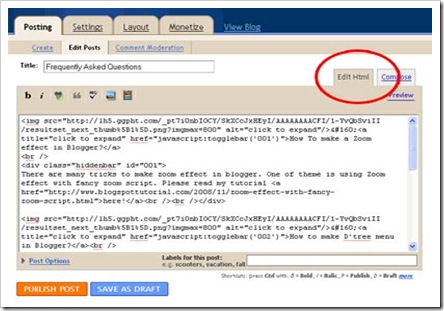
  3. Select the editor using Edit HTML

    post-editor


  4. Copy and then paste the code below into posting column

    <img src="https://blogger.googleusercontent.com/img/b/R29vZ2xl/AVvXsEgtY0SKeyOg5T2i-IxtE1o0t33y9W47NwIB7fvRVntm9kntrezrFAchdwhceBKQ3ShFnmi1sSTaqpP5MuYxC_vAfuwEUBlFKpRAbeax6TCbFqXocyIthdRCqXYuUraB1jtg2GRoLYmgx80/?imgmax=800" alt="click to expand"/>&#160;<a title="click to expand" href="javascript:togglebar('001')">How To make a Page feel effect in Blogger?</a>
    <br />
    <div class="hiddenbar" id="001">
    Hi, friends, in this post, I am gonna teach you how to implement the page peel effect in your blogs.Please read my tutorial <a href="http://wonderful-tricks.blogspot.com/2009/06/z-source.html">here!</a><br /><br /></div>

    <img src="https://blogger.googleusercontent.com/img/b/R29vZ2xl/AVvXsEgtY0SKeyOg5T2i-IxtE1o0t33y9W47NwIB7fvRVntm9kntrezrFAchdwhceBKQ3ShFnmi1sSTaqpP5MuYxC_vAfuwEUBlFKpRAbeax6TCbFqXocyIthdRCqXYuUraB1jtg2GRoLYmgx80/?imgmax=800" alt="click to expand"/>&#160;<a title="click to expand" href="javascript:togglebar('002')">How to Submit your Website or Blog to Bing.com?</a><br />
    <div class="hiddenbar" id="002">
    Microsoft’s new Bing Search Engine is currently the top buzz around the web since it offers ton’s of features like Google. Please read my tutorial <a href="http://wonderful-tricks.blogspot.com/2009/06/how-to-submit-your-website-or-blog-to_04.html">here!</a><br /><br /></div>

    <img src="https://blogger.googleusercontent.com/img/b/R29vZ2xl/AVvXsEgtY0SKeyOg5T2i-IxtE1o0t33y9W47NwIB7fvRVntm9kntrezrFAchdwhceBKQ3ShFnmi1sSTaqpP5MuYxC_vAfuwEUBlFKpRAbeax6TCbFqXocyIthdRCqXYuUraB1jtg2GRoLYmgx80/?imgmax=800" alt="click to expand"/>&#160;<a title="click to expand" href="javascript:togglebar('003')">Sending only content summary for your feedburner subscribers via email</a><br />
    <div class="hiddenbar" id="003">
    Many of the blogger in the world uses Feedburner which is now associated with google and its leading nowadays. Please read my tutorial <a href="http://wonderful-tricks.blogspot.com/2009/05/sending-only-content-summary-for-your.html">here!</a><br /><br /></div>

    <img src="https://blogger.googleusercontent.com/img/b/R29vZ2xl/AVvXsEgtY0SKeyOg5T2i-IxtE1o0t33y9W47NwIB7fvRVntm9kntrezrFAchdwhceBKQ3ShFnmi1sSTaqpP5MuYxC_vAfuwEUBlFKpRAbeax6TCbFqXocyIthdRCqXYuUraB1jtg2GRoLYmgx80/?imgmax=800" alt="click to expand"/>&#160;<a title="click to expand" href="javascript:togglebar('004')">How to Add Simple Dock Menu (FishEye Menu) For Blogs</a><br />
    <div class="hiddenbar" id="004">
    A fisheye-menu/dock menu is a menu with pictorial menu items which zoom on mouse-hover, and are linked to different web pages. Please read my tutorial <a href="http://wonderful-tricks.blogspot.com/2009/05/how-to-add-simple-dock-menu-fisheye.html">here!</a><br /><br /></div>


  5. Click Publish

  6. Done, now see the result

At the example above, Wonderful-Tricks only creates four Questions with the Answers, you can add if you want, but you have to the unique code or different ID as Kang Rohman provides in red-printed code. The Unique ID can be anything; the most important is that it is different from the ID before, e.g. you end with 005, 006, 007,008, etc.

Happy trying!


[Source]

Blogumulus by Wonderful-Tricks

Followers